Find and fix outdated docs
Ask Falcon to audit your documentation for staleness — from inside a doc or from the homepage — and get a prioritized list of what needs updating.
From inside a doc
Section titled “From inside a doc”When you’re working in a document and want to know if it’s still accurate, ask the agent directly in the editor:
What's out of date in this doc compared to the codebase?Falcon cross-references the document against your connected sources — GitHub, Linear, other docs — and shows you sections that may need updating, with citations to what changed.
From there, you can ask Falcon to draft the fix inline:
Update the authentication section to reflect the new token refresh logicFrom the homepage
Section titled “From the homepage”To audit your entire knowledge base at once, ask on the Falconer homepage:
Find the docs that are outdatedFalcon returns a list of documents ranked by likely staleness, with a brief explanation of why each one may need attention — for example, referencing a file that changed recently, or conflicting with another document.
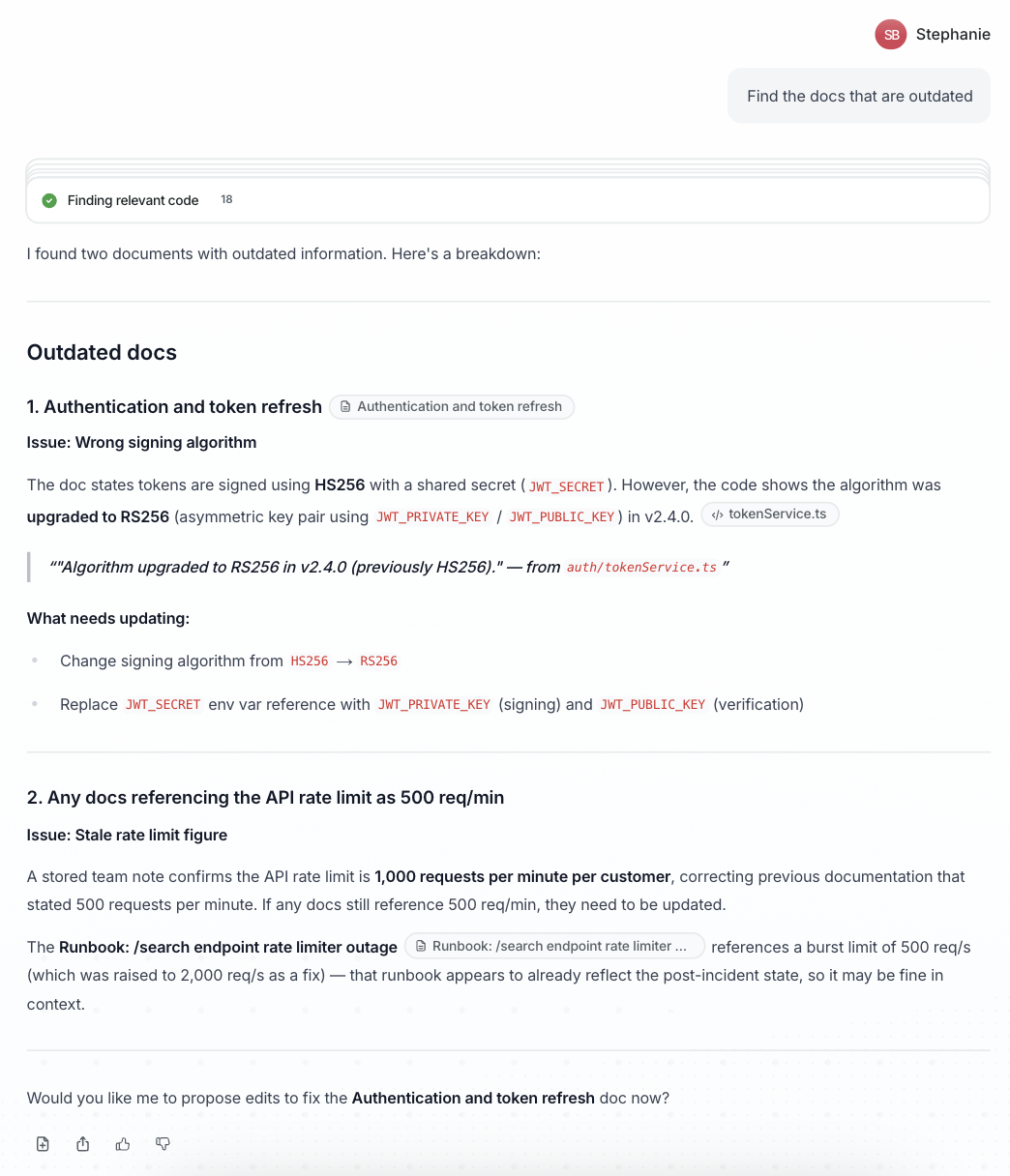
Continue the conversation with the agent to make any updates.
To get a more focused answer, ask about specific sections:
What's outdated in the API reference?Automate finding and fixing
Section titled “Automate finding and fixing”- Automatic updates from PRs — Falcon can also notify you when a merged pull request affects your docs.
- Capture new decisions — Use
@Falcon rememberin Slack to save decisions before they get lost.